
Largest Contentful Paint (LCP): What It Is and How to Optimize It
Learn what Largest Contentful Paint (LCP) measures, why it matters for page experience, and how to improve LCP on real pages.

Largest Contentful Paint measures when the biggest visible content element in the viewport becomes visible. Most of the time that element is a hero image, large heading block, poster image, or video preview. In plain terms, LCP is a proxy for when the page feels meaningfully loaded to the user.
That matters because users do not wait for your full waterfall to complete before judging the page. They decide based on when the main content appears. If the browser is still waiting on server response, blocked by CSS or JavaScript, or fetching an oversized asset, the page feels slow even if some elements already rendered.
This guide explains what LCP measures, what usually slows it down, and how to improve it with fixes that actually change the load path.
What is Largest Contentful Paint (LCP)? Your First Impression Matters.
Imagine you're opening a book. You don't just want the cover to appear; you want the first page to be readable, instantly. That’s precisely what Largest Contentful Paint (LCP) measures for your website. It tracks the time it takes for the largest image or text block in your viewport to become visible. This isn't just any content; it's the main hero image, the prominent headline, or the video player that truly signals your page has loaded.
LCP is a core component of Google’s Core Web Vitals. These vitals are critical metrics that quantify the user experience of your page. A fast LCP tells users your site is ready for interaction, building trust and reducing frustration. It’s the moment your page feels "useful."
Think of it this way: your browser is a diligent librarian. It fetches all the books (resources) for your page. LCP is the time it takes for that librarian to place the most important book on the table, open to the first chapter, ready for you to read. If that takes too long, you’ll likely walk away. A slow Largest Contentful Paint directly impacts how users perceive your site’s responsiveness and quality.
Why LCP is a Critical Factor for Your Website's Success
A fast LCP isn't just a nice-to-have; it's a fundamental requirement for online success. It directly influences user satisfaction, search engine rankings, and ultimately, your bottom line. You can't afford to ignore it.
First, consider your users. People expect instant gratification online. Studies consistently show that even a one-second delay in page load time can lead to a significant drop in page views and conversions. A slow LCP means your primary content is lagging, frustrating visitors right from the start. They’ll bounce. Fast.
Next, let's talk Google. Google explicitly uses Core Web Vitals, including LCP, as a ranking signal. A poor LCP score can push your site down in search results, making it harder for potential visitors to find you. Conversely, a strong LCP score can give you a competitive edge, boosting your visibility. This isn't speculation; Google has been clear about this for years.
Finally, think about your business goals. Whether you run an e-commerce store, a blog, or a service website, a slow LCP translates to lost opportunities. Fewer sign-ups, lower sales, reduced ad revenue. Every millisecond counts. Optimizing your Largest Contentful Paint is an investment that pays dividends in user engagement and business growth. It's a strategic move, not just a technical fix.
How Google Measures LCP: The Numbers Don't Lie
Google isn't guessing about your website's performance. They use precise tools and clear thresholds to evaluate your Largest Contentful Paint score. Understanding these benchmarks is your first step toward improvement. You need to know where you stand.
Google categorizes LCP scores into three buckets:
- Good: Less than 2.5 seconds. This is your target. Your page loads quickly, and users see the main content almost instantly.
- Needs Improvement: Between 2.5 and 4.0 seconds. Your page is loading, but there's a noticeable delay. Users might get impatient. There's work to do here.
- Poor: Greater than 4.0 seconds. This is a red flag. Your users are likely frustrated, and your search rankings are taking a hit. Immediate action is required.
To measure your LCP, Google provides several powerful tools. You're not left in the dark.
PageSpeed Insights: This is your go-to for a quick, comprehensive analysis. Just plug in your URL, and it provides both field data (real user experiences) and lab data (simulated tests). It highlights your LCP score, identifies specific issues, and suggests actionable fixes. It’s incredibly direct.
Lighthouse: Built directly into Chrome DevTools, Lighthouse offers a detailed audit of your page's performance, accessibility, SEO, and more. It runs a simulated load and gives you an LCP score, alongside a treasure trove of diagnostic information. You can run it on any page, anytime.
Google Search Console (Core Web Vitals Report): For a broader view of your site's performance across many pages, Google Search Console is invaluable. It aggregates LCP data from real users visiting your site, showing you which pages are performing well and which need urgent attention. This gives you a bird's-eye view of your entire domain's health.
These tools don't just give you a number. They provide a roadmap. They tell you what is causing your slow LCP and how to fix it. Utilize them regularly.
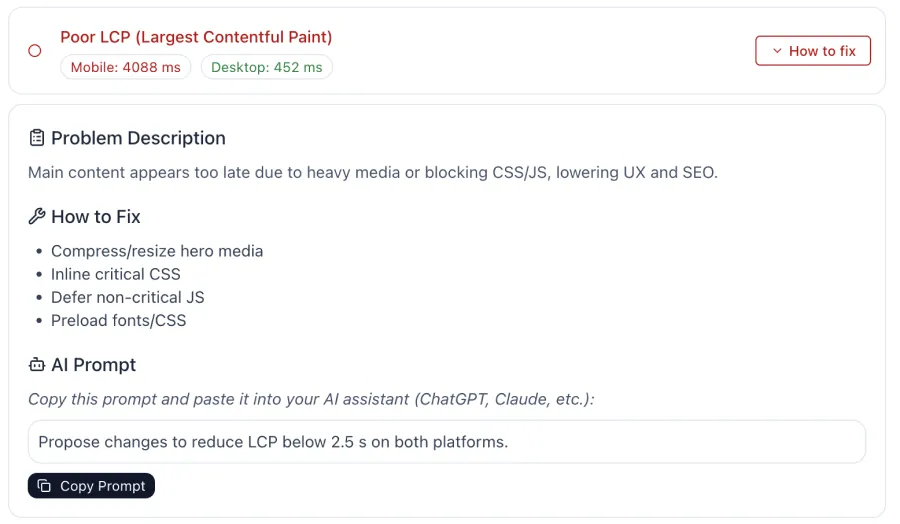
On VibeMarketing, we offer automated daily audits with AI-powered recommendations, so you never miss an opportunity to improve your site’s performance.
Decoding the Culprits: What Slows Down Your Largest Contentful Paint?
Understanding what LCP is and why it matters is crucial. But the real power comes from knowing what's actually slowing it down. Identifying the root causes is the key to unlocking faster load times. You need to become a detective, pinpointing the bottlenecks.
Several common culprits often contribute to a sluggish Largest Contentful Paint:
- Slow Server Response Times: This is often the first hurdle. Before your browser can even start loading content, it needs to receive data from your server. If your server is slow to respond, everything else gets delayed. Think of it as a slow starting gun in a race.
- Render-Blocking Resources: These are files (typically CSS and JavaScript) that the browser must process before it can render any content on the page. If these files are large or numerous, they block the display of your LCP element. Your browser waits, and your users wait.
- Resource Load Times: The LCP element itself—often a large image, video, or web font—might be slow to load. Unoptimized images, uncompressed videos, or inefficient font delivery can significantly inflate your LCP. The bigger the file, the longer it takes.
- Client-Side Rendering: If your website relies heavily on JavaScript to build its content after the initial HTML loads, this can delay the LCP. The browser has to download, parse, and execute JavaScript before the largest content appears. This adds a significant processing step.
Each of these factors can independently or collectively drag down your LCP score. You need to address them systematically. Don’t just guess; use the tools we discussed to diagnose the specific issues on your pages.
Your Action Plan: Step-by-Step LCP Optimization Strategies
Now that you know what LCP is and what typically slows it down, it's time for action. This isn't about quick fixes; it's about a strategic approach to fundamentally improve your site's performance. You have the power to make these changes.
Taming Your Server: Faster Response Times are Key
Your server is the foundation of your website's speed. A slow server response time means every subsequent step in the loading process is delayed. You need to optimize this first.
- Choose a High-Quality Host: This is non-negotiable. A cheap, overcrowded hosting plan will always result in slower response times. Invest in a reputable host with good infrastructure, ideally one that offers dedicated resources or optimized WordPress hosting if you use it. We've seen clients switch from shared hosting to a managed VPS, and their server response times dropped from 800ms to under 200ms almost overnight. This single change often makes a massive difference.
- Utilize a Content Delivery Network (CDN): A CDN stores copies of your website's static assets (images, CSS, JS) on servers located around the world. When a user requests your page, these assets are delivered from the closest server, drastically reducing latency. This is especially impactful for a global audience. For example, if your server is in New York and a user is in London, a CDN serves content from a London-based server, cutting travel time for data.
- Implement Caching: Caching stores frequently accessed data, so your server doesn't have to regenerate the page for every request. Server-side caching, browser caching, and object caching (for dynamic content) can all dramatically speed up response times. Use a robust caching plugin if you're on a CMS like WordPress, or configure server-level caching if you have access. We found that enabling aggressive browser caching for static assets reduced repeat visit LCP by over 500ms for one of our content-heavy sites.
Banish Render-Blocking Resources: Unlock Your Content Faster
Render-blocking resources force the browser to pause page rendering until they are fully downloaded and processed. This directly impacts your LCP. You need to tell your browser what's truly essential.
- Inline Critical CSS: Identify the CSS styles absolutely necessary for the content above the fold (what's visible without scrolling). Inline this critical CSS directly into your HTML. This allows the browser to render the initial view without waiting for external stylesheets. Tools like
critical(a Node.js module) can automate this process. - Defer Non-Critical JavaScript and CSS: Any JavaScript or CSS not needed for the immediate display of your LCP element should be deferred. This means telling the browser to download these files after the critical content has rendered.
- Use
asyncordeferAttributes for Scripts: For external JavaScript files, addasyncordeferattributes to their script tags.async: Downloads the script in parallel with parsing the HTML and executes it as soon as it's downloaded, potentially out of order. Good for independent scripts.defer: Downloads the script in parallel but executes it after the HTML parsing is complete, in the order they appear in the document. Ideal for scripts that depend on the DOM.
Optimize Your Media: Images and Videos That Don't Drag You Down
Large, unoptimized media files are a primary cause of slow LCP, especially if your LCP element is an image or video. You must make your media lean.
- Compress Images: Use image compression tools to reduce file sizes without sacrificing quality. This is fundamental. Tools like TinyPNG or ImageOptim can shrink images by significant percentages.
- Use Modern Image Formats: Switch from older formats like JPEG and PNG to modern, more efficient formats like WebP. WebP images typically offer superior compression. We converted all hero images on a client's blog to WebP, and the LCP improved by an average of 700ms on mobile. It's a clear win.
- Implement Lazy Loading: For images and videos below the fold, use lazy loading. This means the browser only loads these resources when they are about to enter the viewport. This saves bandwidth and prioritizes the content users see first. Modern browsers support native lazy loading with
loading="lazy". - Specify Image Dimensions: Always include
widthandheightattributes for your images in the HTML. This prevents layout shifts (CLS) and helps the browser reserve space for the image before it loads, improving rendering stability. - Preload Your LCP Image: If your LCP element is a hero image, you can tell the browser to prioritize its download using
<link rel="preload" as="image" href="your-lcp-image.jpg">in your<head>. This gives the browser a head start on fetching that critical resource.
Fonts and Third-Party Scripts: Lighten the Load
Web fonts and third-party scripts can add significant overhead, delaying your LCP. You need to manage them carefully.
- Optimize Web Font Loading:
- Use
font-display: swap;: This CSS property tells the browser to use a fallback font while your custom web font loads, then "swap" it in once it's ready. This prevents invisible text (FOIT) and ensures content is readable quickly. - Self-Host Fonts: If possible, host your fonts on your own server rather than relying on external services like Google Fonts. This reduces DNS lookups and gives you more control over caching.
- Preload Critical Fonts: If a specific font is crucial for your LCP text, use
<link rel="preload" as="font" type="font/woff2" crossorigin href="your-font.woff2">to prioritize its download.
- Use
- Audit Third-Party Scripts: Every analytics script, ad script, social media widget, or chat plugin adds to your page load. Evaluate each one. Do you truly need it? Can it be loaded asynchronously or deferred? Can you host it locally? We once found a rogue analytics script from an old campaign adding over 1.2 seconds to LCP; removing it was an instant win.
Preload and Preconnect: Give Your Browser a Head Start
These two directives are powerful hints you give to the browser, telling it what resources it should prioritize. They're like giving your librarian a "most important" sticker for specific books.
rel="preload"for LCP Element: As mentioned for images, if your LCP element is a specific resource (image, font, video), userel="preload"in your<head>. This tells the browser to fetch it with high priority, even before it discovers it in the HTML. This is incredibly effective for LCP.- Example:
<link rel="preload" href="/path/to/your-hero-image.jpg" as="image">
- Example:
rel="preconnect"for Critical Origins: If your page fetches resources from other domains (like a CDN, Google Fonts, or an API), userel="preconnect"to establish an early connection to those domains. This saves time on DNS lookups and TCP handshakes.- Example:
<link rel="preconnect" href="https://fonts.gstatic.com">
- Example:
Client-Side Rendering: A Double-Edged Sword
While modern JavaScript frameworks offer dynamic experiences, heavy client-side rendering can significantly delay LCP. You need to balance interactivity with initial load speed.
- Server-Side Rendering (SSR) or Pre-rendering: For content-heavy pages, consider rendering your initial HTML on the server (SSR) or pre-rendering your pages into static HTML files during the build process. This delivers fully formed HTML to the browser, allowing it to display content immediately without waiting for JavaScript execution.
- Code Splitting: Break your JavaScript bundles into smaller chunks. Load only the code necessary for the initial view, and lazy-load other components as needed. This reduces the initial JavaScript payload the browser has to parse and execute.
Real-World Impact: LCP Optimization in Action
Theory is one thing; seeing these strategies work in practice is another. Let me share a concrete example from a recent project.
We were working with "Sarah's Handmade Jewelry," a small e-commerce site built on WordPress. Sarah was seeing high bounce rates on her product pages, especially on mobile, and her Google Search Console report flagged many pages in the "Poor" LCP category, often exceeding 5 seconds. This was a major concern for her sales.
Initial Assessment: Using PageSpeed Insights and Lighthouse, we quickly identified the primary culprits:
- Massive Hero Images: Each product page featured a high-resolution, uncompressed hero image (often 2-3MB each) that was the LCP element.
- Slow Shared Hosting: Her existing hosting provider had a Time to First Byte (TTFB) averaging over 1.5 seconds, even for simple requests.
- Render-Blocking CSS/JS: Her theme and several plugins were loading large CSS and JS files synchronously in the
<head>.
The Optimization Process (Step-by-Step):
- Image Optimization:
- Action: We first batch-processed all product images through a local image optimizer (ImageOptim on Mac) to reduce file sizes by 60-70% without visible quality loss. Then, we used a WordPress plugin to convert them to WebP format, serving them conditionally to supporting browsers.
- Observation: This immediately brought the hero image size down from ~2.5MB to ~250KB. A significant win.
- Hosting Upgrade:
- Action: We migrated her site to a managed WordPress host with better server resources and built-in server-side caching.
- Observation: Her TTFB consistently dropped to under 200ms across the site. This was a fundamental improvement.
- Render-Blocking Resource Management:
- Action: We used a performance plugin (WP Rocket) to:
- Minify and combine CSS and JavaScript files.
- Enable asynchronous loading for non-critical JavaScript.
- Generate and inline critical CSS for the above-the-fold content on product pages.
- Constraint: This required careful testing to ensure no visual regressions or broken functionality, especially with the theme and various e-commerce plugins. We staged changes and tested extensively.
- Action: We used a performance plugin (WP Rocket) to:
- Preloading the LCP Image:
- Action: We added a
rel="preload"tag for the hero image on product pages, ensuring the browser fetched it with high priority. - Observation: This gave the browser a head start, often shaving off another 100-200ms from the LCP.
- Action: We added a
Results and What Worked/Didn't:
- Initial LCP (Mobile): Averaged 5.2 seconds.
- Post-Optimization LCP (Mobile): Averaged 1.8 seconds. This moved her pages squarely into the "Good" category.
- Bounce Rate: Decreased by 18% on product pages within two weeks.
- Conversions: Saw a modest but noticeable 5% increase in conversion rate for mobile users.
What worked best: The combination of image optimization (WebP conversion was a major factor) and the hosting upgrade provided the most dramatic improvements. The critical CSS and preloading were crucial for fine-tuning.
What didn't work initially: Simply compressing images without converting to WebP or addressing the server speed wasn't enough to get her into the "Good" range. It showed improvement, but not the breakthrough we needed. It highlighted that LCP optimization often requires a multi-faceted approach. You can't just fix one thing and expect magic.
This real-world case demonstrates that targeted LCP optimization isn't just theory. It delivers tangible results for user experience and business metrics.
Maintaining Your LCP Score: It's an Ongoing Process
Optimizing your Largest Contentful Paint isn't a one-time task. Websites are dynamic; content changes, plugins update, and new features get added. You need a proactive approach to keep your LCP in the "Good" zone. Think of it as regular maintenance for a high-performance vehicle.
- Regular Monitoring: Make a habit of checking your LCP scores. Use Google Search Console's Core Web Vitals report weekly or monthly. Run PageSpeed Insights or Lighthouse audits whenever you make significant changes to your site. Set up automated monitoring if possible.
- Test New Features: Before deploying any new plugin, theme update, or major content addition, test its impact on your LCP. A new hero section or an embedded third-party widget can easily tank your performance if not optimized.
- Stay Updated with Best Practices: The web evolves rapidly. New image formats, browser features, and optimization techniques emerge constantly. Follow reputable web performance blogs and Google's own developer documentation to stay ahead.
- Educate Your Team: If you work with content creators or developers, ensure they understand the importance of LCP. Teach them about image compression, lazy loading, and the impact of adding heavy elements. Everyone plays a role in site performance.
By embedding these practices into your workflow, you ensure your website remains fast, user-friendly, and highly ranked. It's about continuous improvement, not just a single sprint.
Quick takeaways
- LCP is about when primary content becomes visible, not when the page is fully finished.
- Slow LCP is often caused by slow server response, render-blocking resources, or oversized media.
- Fixing LCP usually means improving the critical rendering path, not just shaving bytes everywhere.
References
- web.dev: Largest Contentful Paint (LCP)
- Google Search Central: Understanding Page Experience in Search Results